
Overview:
ESP-Drone V2.0 is an open source drone solution based on Espressif ESP32-S2 Wi-Fi chip, which can be controlled over a Wi-Fi network using a mobile APP or gamepad. ESP-Drone supports multiple flight modes, including Stabilize mode, Height-hold mode, and Position-hold mode. With simple hardware, clear and extensible code architecture, ESP-Drone can be used in STEAM education and other fields. The main code is ported from Crazyflie open source project with GPL3.0 protocol.
Main Features:
ESP-Drone has the following features:
Stabilize mode: keep the drone stable to achieve smooth flight.
Height-hold mode: control thrust output to keep the drone flying at a fixed height.
Position-hold mode: keep the drone flying at a fixed position.
PC debugging: use cfclient for static/dynamic debugging.
Controlled by APP: easily controlled over Wi-Fi by your mobile APP.
Controlled by gamepad: easily controlled via the gamepad by cfclient.
ESP-Drone V2.0 consists of a main board and several extension boards:
Main board: integrates an ESP32-S2 module, necessary sensors for basic flight, and provides hardware extension interfaces.
Extension boards: integrate extension sensors via hardware extension interfaces of the main board, to implement advanced flight.
| No. | Modules | Main Components | Function | Interfaces | Mount Location |
| 1 | Main board – ESP32-S2 | ESP32-S2-WROVER + MPU6050 | Basic flight | I2C, SPI, GPIO, extension interfaces | |
| 2 | Extension board – Position-hold module | PMW3901 + VL53L1X | Indoor position-hold flight | SPI + I2C | Mount at bottom, facing to the ground. |
| 3 | Extension board – Pressure module | MS5611 pressure module | Height-hold flight | I2C or MPU6050 slave | Mount at the top or at the bottom |
| 4 | Extension board – Compass module | HMC5883/QMC5883/IST8310 compass | Advanced flight mode, such as head-free mode | I2C or MPU6050 slave | Mount at the top or at the bottom |
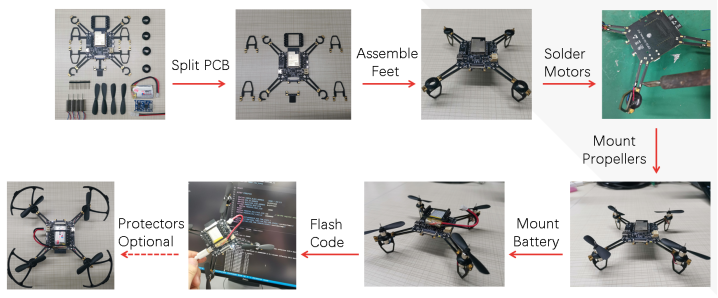
If the motor rotates in the wrong direction, simply change the position of the motor wire.
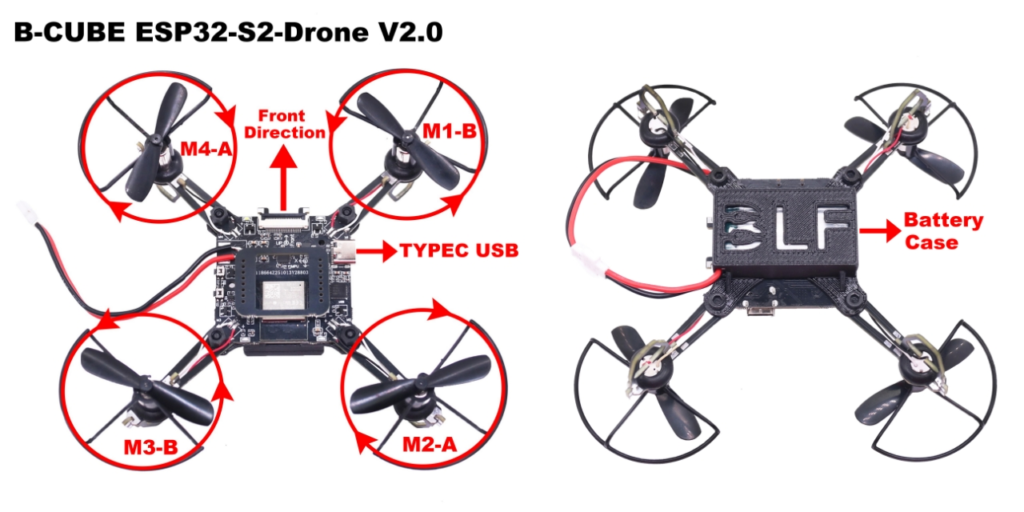
l Network hotspot: ESP-Drone_XXXXXX
l Password: 12345678
l Battery:1S 3.7V 300-800ma (The supply voltage cannot exceed 4.2V)
l For Android, please scan the QR below to download ESP-Drone APP.
Android APP source code: https://github.com/EspressifApps/ESP-Drone-Android
l Recommended app to open and use: controller settings->Use gyroscope sensors